Boards
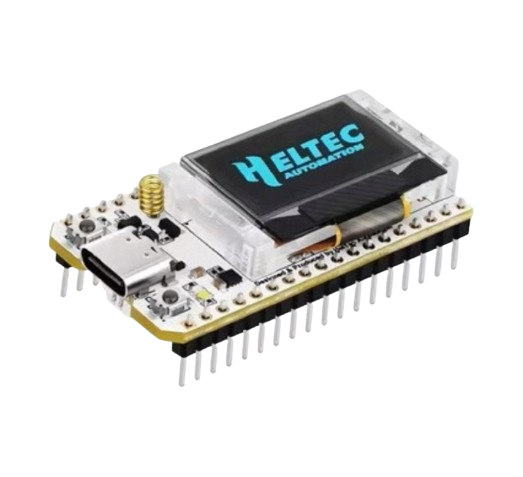
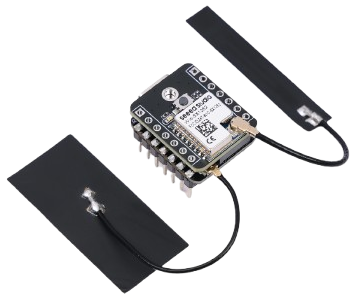
Any ESP32-S3 board with an SX1262 (Heltec WiFi LoRa 32 V3, LilyGo T3-S3 and similar). Flash the ESP32-S3 + LoRa tile on the web flasher. The firmware detects the radio at boot; without one, the LoRa screens simply do not appear.
1. Emergency mode (free, two-way)
When the node loses its uplink (Wi-Fi dead, ISP down), it parks on the home channel and broadcasts up to four readings you chose every few minutes: temperature, a valve state, a text status — anything the node has as an entity. Values are compact (ASCII, 8 characters).
Anyone who hears it delivers it. Another node, or a LoRaWAN gateway running the Sensmos agent, forwards the frame over its own internet. You get a push and an Emergency Panel in the app: the readings with their age, who heard them, and a command box.
Commands back. From the panel you can send a short command (up to 8 characters, e.g. water_off) — signed by your wallet, limited to 4 per hour. The network picks a node in range of yours to transmit it; your node executes it locally (webhook, MQTT, a script action) and confirms in its next broadcast. Latency is one broadcast cycle, a few minutes.
Switch it on: node → Settings → LoRa → Emergency: pick up to four entities, optionally a webhook the node should call when a command arrives (POST JSON or GET, e.g. a UniFi or Shelly URL). The Emergency Panel appears on the node card automatically when the node goes dark.
2. Your own LoRa sensors (frames)
Any LoRa transmitter — an ESPHome board, a custom sensor — can send a small frame addressed to your node. The frame carries the node's id and a sub-address (1–255) so one node can serve many sensors.
- Encrypted (recommended): the sensor and the node share a key phrase. The node decodes; the server only sees "a frame for node X" and routes it. Decoding happens on your node, in open firmware you can read — or, if the sensor sends to your paired LoRaWAN gateway, in your own Home Assistant (below).
- Plain (opt-in): accepted only if you switch it on, because anyone who knows your node id could send one. Fine for toys and read-only telemetry; never for actuators.
Frames land in the node's LoRa inbox (app: node → Settings → LoRa → Inbox), on MQTT (lora_frame, lora_frame.N per sensor) and in Home Assistant as sensors and events. A delivery receipt (metadata only) tells the network the frame arrived.
Heard by anyone, delivered to you. If your sensor is out of your own node's range but another node or gateway hears it, the frame reaches your node over the internet. Your node does not need to hear its sensors itself.
Switch it on: node → Settings → LoRa → Frame receive: set the key phrase, optionally allow plain frames.
3. Sending to a sensor
lorasend on the node (app: Settings → LoRa → Send, or the HA service sensmos.lora_send) transmits a frame to one of your own sensors: destination = your node, sub = the sensor. Only the sensor's own node transmits to it — there is no relaying through other people's radios. Sending to another node goes over the internet and that node's radio does the last hop.
A worked example: the car parked outside
Your car sits sixty metres and two walls away, with no internet and no power to spare. This is what section 2 is for: the car gets a sensor, not a node. The node stays in your flat.
In the car. An ESP32 with an SX1262 radio on a small battery, a vibration sensor, and a reed switch on the door. It sleeps, wakes on movement, sends one encrypted frame to a sub-address of your node, and sleeps again. A frame is a few bytes, so a battery lasts months.
At home. Node → Settings → LoRa → Frame receive: set the key phrase, give the car sub-address 1. That is the whole setup.
What you get. The frame lands in the LoRa inbox, on MQTT and in Home Assistant. A script on the node turns it into a push: movement 02:14, door opened, battery 11.6 V.
If your own node does not hear it, a neighbour's node or a gateway may, and the frame still reaches you over their internet — encrypted, so nobody on the way can read it.
Be honest about what this is. A notification, not an alarm and not a tracker. Radio delivery is never guaranteed, there is one hop and no mesh, and a block of flats eats range. The same recipe covers a garage, a bike shed, a caravan or a boat.
Frame format (for sensor builders)
plain:      [0xE0][0x02][flags][dst 4B][sub 1B][payload ≤128 B][CRC32 LE]
encrypted:  [0xE0][0x02][flags][dst 4B][sub 1B][nonce 4B][AES-256-CTR(payload+CRC32)]
flags bit0 = AES, bit1 = "last hop" (set only by the node when transmitting to a sensor). Key = SHA-256 of the key phrase. Radio: 868.1 MHz (EU) / 903.9 MHz (US), BW 125 kHz, SF11, CR 4/5, sync 0x34. Full spec incl. duty-cycle duties and the sensor-side rules: API & protocols.
Gateways
A LoRaWAN gateway you already run hears for the whole network two ways. Direct: its packet forwarder also sends to sensmos.com:1700 and you pair the gateway with your wallet in the app — it gets its own card, transmits a coverage beacon every 5 minutes and earns like a node with weight 0.3. Passive: a script on the gateway reports what the forwarder receives, vouched for by a Sensmos node on the same LAN; nothing on the gateway changes. Either way, every Sensmos frame it hears is delivered to its owner. Setup: LoRaWAN gateway.
Roles: Point and Scanner
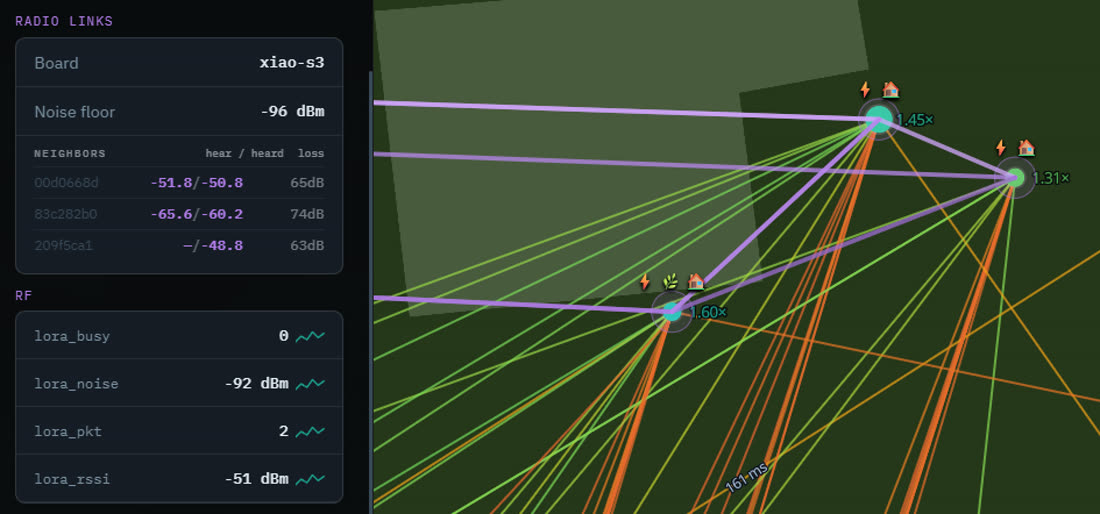
The network assigns each radio node a role. A Point camps on the home channel 24/7 — the reliable ear for emergencies and sensors. A Scanner sweeps channels and samples the spectrum (noise, occupancy, foreign LoRa traffic) and hops to the home channel when it has something to send. Both report what they hear; you can see the radio map on the live map.
Price
| GALU / day of use | Where it goes | |
|---|---|---|
| Emergency mode, commands, panel | 0 — always | — |
| Receive encrypted frames | 0.7 | 70% to the owner of the first foreign node that heard your sensor that day, 30% reward pool |
| Receive plain frames (opt-in) | 0.5 | same |
| Send from your node's radio | 0.8 | reward pool |
Charged once on a day you use the feature; nothing is blocked by an empty balance. See Wallet & fees.